
Aqara Home
Shenzhen Aqara Software Service Co., Ltd.House & Home
4.4228.00 Reviews
- Version
- 6.3.9
- Installs
- 500.00K
- Age Rating
- Everyone
Screenshots

Our Review of Aqara Home
 Analysis by Appyee
When I think about a smart home, the useful question is not how many devices I can connect, but whether the routine from noticing a problem to doing something about it feels clear. That is the angle I took with Aqara Home: it brings Aqara sensors, switches, cameras, and automations together, with the aim of making everyday actions easier to manage. I found it most compelling when a device event led to a practical result, rather than when I was simply browsing controls.
There is a real distinction between this app and a general smart-home dashboard. Aqara Home is made by Shenzhen Aqara Software Service Co., Ltd. and is centered on Aqara equipment, even though it can fit into broader smart-home setups. If your home already relies on Aqara devices, one place to check status and build routines is a sensible starting point. If you expect a single app to configure every brand in your house equally, I would first check whether your particular devices and chosen ecosystem work together as you need.
Start with the event you want to handle
A useful first step is to name a small annoyance rather than trying to automate the whole house. Maybe a hallway light is inconvenient to reach, or you want to check a room while away. Then identify which Aqara device supplies the information or action: a motion sensor can report movement, a switch can control a light, and a camera can provide a view. Thinking in terms of input and outcome makes the setup easier to reason about than adding devices without a clear job for them.
The app supports sensors, switches, and cameras, among other Aqara devices. In my experience, it helps to bring them into the app one at a time and confirm that each one appears and responds before building a routine around it. That way, if a later scene does not behave as expected, you have fewer possible causes to investigate. The initial experience is approachable, but a smart-home setup still depends on having compatible equipment and completing its pairing correctly.
Build a routine that has a clear outcome
Have you ever dreamed of having a fully automated home where everything just works? Well, let me dive into my experience with Aqara Home, an app designed to make your smart home dreams a reality. This app is available for both Android and iOS, and I've had the chance to explore what it offers. Buckle up as I take you through my journey with this smart home companion.
Getting Started with Aqara Home
Setting up Aqara Home was a breeze. After downloading the app from the App Store, I was greeted with a sleek, intuitive interface. The app walks you through the setup process, which includes connecting your Aqara devices to your home Wi-Fi network. Trust me, even if you’re not tech-savvy, you’ll find this process straightforward and painless.
The app supports a variety of Aqara devices such as sensors, switches, and cameras. I have a couple of sensors and a smart camera, and linking them up was as easy as pie. Just a few taps, and voila! Everything was ready to go.
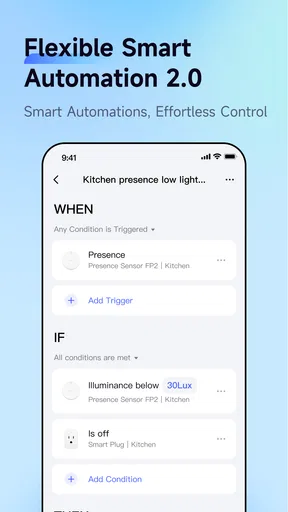
Once the devices are in place, I would start with one simple scene and test it during the part of the day when it is meant to help. For example, a motion-triggered light is easy to understand: movement is the input, and the light turning on is the result. A useful refinement is to think about when that action should happen, not only what should happen. If a light turning on every time someone passes becomes annoying, the routine needs a more thoughtful condition or a different device arrangement, rather than more automation for its own sake.
This is also where I would avoid making a scene responsible for too many unrelated tasks. A routine that controls several rooms may look efficient, but it can be harder to spot which condition caused an unexpected result. Smaller scenes are easier to test and adjust. I would name them for the outcome, such as a room or an activity, so that later edits are less of a guessing game.
Features That Stand Out
One of the standout features of Aqara Home is its automation capabilities. You can create "Scenes" to automate tasks based on specific conditions. For instance, I set up a scene to switch on the lights when the motion sensor detects movement. How cool is that?
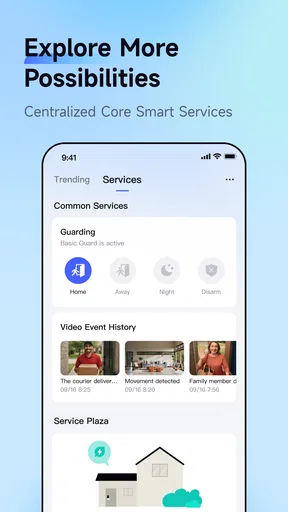
The app also allows you to monitor your home remotely. I often check in on my smart camera via the app while I’m at work. The live video feed is crisp and clear, and there's a two-way audio feature that lets me communicate with anyone at home. It’s like having a security guard in your pocket!
A realistic day-to-day workflow might begin with leaving home and later opening the app to check a camera view, then using a sensor event or scene to understand what happened and decide what to do next. The camera is useful for a quick visual check, while an automation can handle a repeated response without asking you to open the app each time. I would treat those as complementary tools: remote viewing helps when you want context, and a scene helps when the same action makes sense repeatedly.
There is a trade-off in that handoff. A camera can show what is happening, but it does not automatically make every situation clear; you still need to interpret the view and choose a response. Likewise, a sensor can trigger a routine, but a trigger is only helpful if its location and purpose suit the household. Before relying on an automated action, I would test it while at home and make sure the result is convenient for everyone who uses that space.
Another neat feature is the integration with other smart home ecosystems. Whether you're an Apple HomeKit enthusiast or a Google Assistant fan, Aqara Home plays nice with all major platforms. This means you can control your Aqara devices using voice commands or integrate them with other smart gadgets you own.
For someone deciding between this and a platform-first alternative, the choice depends on where the devices live. A broad ecosystem app may be a better everyday control center if most of your equipment comes from different manufacturers and you want to manage everything from one place. Aqara Home makes more sense when Aqara devices are central to the routine and you want to configure their scenes and check their status directly. I would regard ecosystem integration as a useful bridge, not a guarantee that every feature will behave identically across every app.
Everyday Use and Reliability
In terms of everyday use, the app is quite reliable. I haven’t encountered any major bugs or crashes, which is a huge plus. The real-time updates from my sensors are prompt and accurate, ensuring that I am always in the loop about what's happening at home.
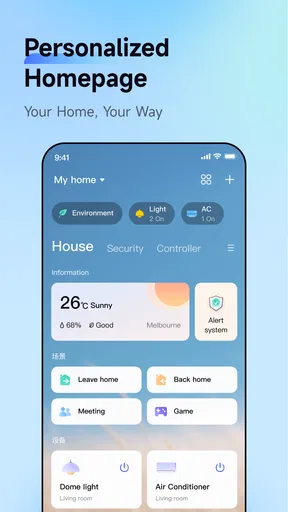
The app’s user interface deserves a special mention. It's clean, modern, and easy to navigate. Even with a plethora of features, Aqara Home manages to keep everything organized, so you never feel overwhelmed.
For a household, the practical question is not only whether the person who set things up can use the app, but whether the routine remains understandable when someone else needs it. I would keep scene names plain and make sure a manual control remains available for everyday needs. That gives family members a straightforward fallback if a sensor does not trigger as expected or someone simply wants to operate a light in the usual way.
Another good habit is to separate “I want to know” from “I want the home to act.” A camera is for checking; a motion sensor and switch can form part of an automatic response. Keeping that distinction in mind prevents overconfidence in any one device and makes it easier to decide which notification or action is genuinely useful. If a scene generates unnecessary activity, simplify it instead of adding more steps to manage the noise.
Aqara Home is a free House & Home app, with in-app purchases listed from five cents to just under one hundred dollars per item. Its Everyone age rating makes it suitable for a broad audience, though the connected devices and how a household uses them still shape the experience. The app has a 4.1 average from around 11,000 ratings, and it has passed 500,000 installs. I see those figures as context rather than a promise: the app’s usefulness depends heavily on whether its Aqara-focused approach matches the devices you own.
The app is currently at version 6.1.2 and requires Android 8.0 or later. It was released on February 22, 2021. For iPhone users, the app is also available on iOS, while Android users should check their device’s compatibility before installing. Those details matter most if you are setting up an older phone as a shared household controller or expect to use a device that no longer receives system updates.
Where the flow can break
After spending some quality time with Aqara Home, I can confidently say that it’s a solid choice for anyone looking to enhance their smart home experience. Its user-friendly setup, robust features, and interoperability with other ecosystems make it a standout app in the smart home arena.
The main limitation I would plan around is dependence on a compatible Aqara setup. The app cannot make an unrelated device part of an Aqara routine simply because it appears elsewhere in your smart home. Before buying equipment, map the job you want done to the specific sensor, switch, or camera that can do it, and check that the device fits the ecosystem you already use. This avoids building a plan around a handoff that your chosen hardware cannot support.
There is also a difference between an easy first setup and a setup that stays easy as it grows. Each extra scene creates another rule to remember when something changes at home. I would add automation gradually, review whether each scene is still useful, and keep the response simple enough to troubleshoot. That is especially important for routines that affect shared rooms, where a convenient trigger for one person can be disruptive for another.
If your priority is an all-purpose dashboard for a mixed collection of smart-home brands, or you do not plan to use Aqara devices, I would look first at the app tied to your existing ecosystem. If you already have Aqara sensors, switches, or cameras and want to connect their events to everyday actions, this app has a clearer purpose. It is best for people willing to spend a little time testing routines, not for someone expecting every device in the home to configure itself with no decisions.
So, if you're on the hunt for an app that can transform your living space into a smart haven, give Aqara Home a shot. It's a game-changer that brings convenience, security, and a touch of futuristic flair to your doorstep.
My practical recommendation is to begin with one room and one problem: pair the relevant device, confirm its status, make a small scene, and test the result in ordinary use. Then decide whether remote camera access or connection with another smart-home platform adds something you will actually use. With that measured approach, Aqara Home can be a helpful control point for an Aqara-based home; if your devices and routines are mostly outside that world, a broader platform may suit you better.
Verdict
Strengths of Aqara Home
- User-friendly interface for easy navigation.
- Seamless integration with smart home devices.
- Reliable performance with minimal lag.
- Customizable automation scenes and routines.
- Supports a wide range of Aqara devices.
Limitations of Aqara Home
- Limited support for non-Aqara devices.
- Occasional connectivity issues reported.
- Requires a stable internet connection.
- User account setup can be cumbersome.
- Some features locked behind firmware updates.
Similar Picks in This Category
View All
Universal TV Remote Control
CodeMatics Media Solutions3.9

AlfredCamera Home Security app
Alfred Systems Inc.4.7

Planner 5D: AI Home Design
Planner 5D4.5

Universal Tv Remote-Cast to TV
One Music Player4.1

Zillow: Homes for Sale & Rent
Zillow Group4.8

99acres Buy/Rent/Sell Property
infoedge.com4.3
Frequently Asked Questions
What is Aqara Home and how does it work?
Aqara Home is a smart home app that allows users to manage and control various Aqara devices, such as sensors, cameras, and smart plugs, from their smartphone. The app connects to these devices via a central hub and provides a seamless interface to automate and monitor your home environment, ensuring enhanced convenience and security.
Is Aqara Home compatible with other smart home platforms?
Yes, Aqara Home is compatible with several popular smart home platforms, including Apple HomeKit, Google Assistant, and Amazon Alexa. This interoperability allows users to integrate their Aqara devices with existing smart home ecosystems, providing a unified control experience across different brands and devices.
What are the main features of the Aqara Home app?
Aqara Home offers a wide range of features, including device management, automation setup, and scene creation. Users can customize settings for each device, set up automated tasks based on triggers, and create scenes for specific moods or activities. Additionally, the app provides real-time notifications and remote access, enhancing user experience and home management.
How secure is the Aqara Home app?
Aqara Home prioritizes user security by employing encryption and secure data transmission protocols. User data is protected through robust authentication measures, and the app regularly updates to address potential vulnerabilities. While no system is entirely immune, Aqara Home takes significant steps to ensure user privacy and data security.
Are there any costs associated with using Aqara Home?
Downloading and using the Aqara Home app is free. However, users need to purchase compatible Aqara devices to fully utilize the app’s features. While the app itself does not require a subscription, some advanced features or integrations with third-party services might incur additional costs depending on the user's preferences.
